User Profile

On this page, you can read more about the Oma system for volunteers and get support for creating, editing, and deleting your profile.
Oma Punainen Risti is an information system built for volunteers. It facilitates volunteer work by offering new tools to carry out tasks. By creating a profile in the system, volunteers can join different groups, search for trainings, assignments, and events, send messages, and share information about their skills.
It is recommended that every volunteer participating in Red Cross activities creates a user profile in Oma, so that responsible volunteers in local branches can see all active participants and communicate with them. It makes things easier for responsible volunteers when many functions are gathered in one place and are easy to use. Below you can read more reasons why joining Oma is worthwhile.
Volunteer:
- In Oma, you can find trainings, events, and interesting volunteer opportunities. You can register for events and volunteer tasks through Oma. Once you log in to Oma, you will see even more events than as an unregistered user.
- You can join groups created around activities that interest you and receive messages sent within those groups.
- By joining Oma, you stay up to date on what is happening in the organization. You will receive information about current fundraising campaigns or situations where your help may be needed.
- Responsible volunteers in your local branch can contact you via Oma and inform you about current matters in your area.
- Through Oma, you can also subscribe to the Tässä ja Nyt newsletter designed for volunteers.
- You get a comprehensive overview of volunteer activities across Finland through the activity report available in Oma.
- In Oma, you can indicate your willingness to participate in unexpected aid situations, even if you do not otherwise wish to volunteer at the moment.
- Through Oma, you become part of the official volunteer register of the Finnish Red Cross. Only by being part of our volunteer register do we know who our volunteers are nationwide. As a preparedness organization, it is essential that we have a way to reach all volunteers.
Responsible volunteer:
- All new volunteers are directed to Oma. Through Oma, you can welcome new volunteers to your branch and guide them into activities.
- You can coordinate volunteers who have created a profile in Oma and access information about them.
- You can see at a glance the total number of volunteers in your branch and, for example, the number of volunteers who speak a certain language.
- You can filter volunteers based on different interests or skills. With filtering, you can recruit volunteers in a targeted way exactly where the need is greatest.
- You can also see when volunteers have indicated they are available for volunteer tasks.
- You can send messages to your branch’s volunteers.
- You can see which volunteers in your branch can be contacted first in urgent, prolonged aid situations.
- You can create activity groups and coordinate your branch’s volunteer activities through these groups.
- You can monitor the development of your branch’s activities and plan and report operations based on the activity report in Oma.
- When creating an Oma profile, volunteers are informed about the Red Cross ethical guidelines and must accept them. This ensures that everyone acts according to shared principles.
- Data protection perspective
- The central office is the responsible data controller for all information related to Oma. If branches or other actors maintain a separate volunteer register instead of using the centralized digital systems (Oma, Ossi, etc.), they act against the instructions of the volunteer register owners, which increases the data protection risk.
- If Oma is not used at all in the branch, the level of data protection decreases significantly because no one monitors the accuracy of information.
You can create a user profile via Oma’s homepage at oma.punainenristi.fi.
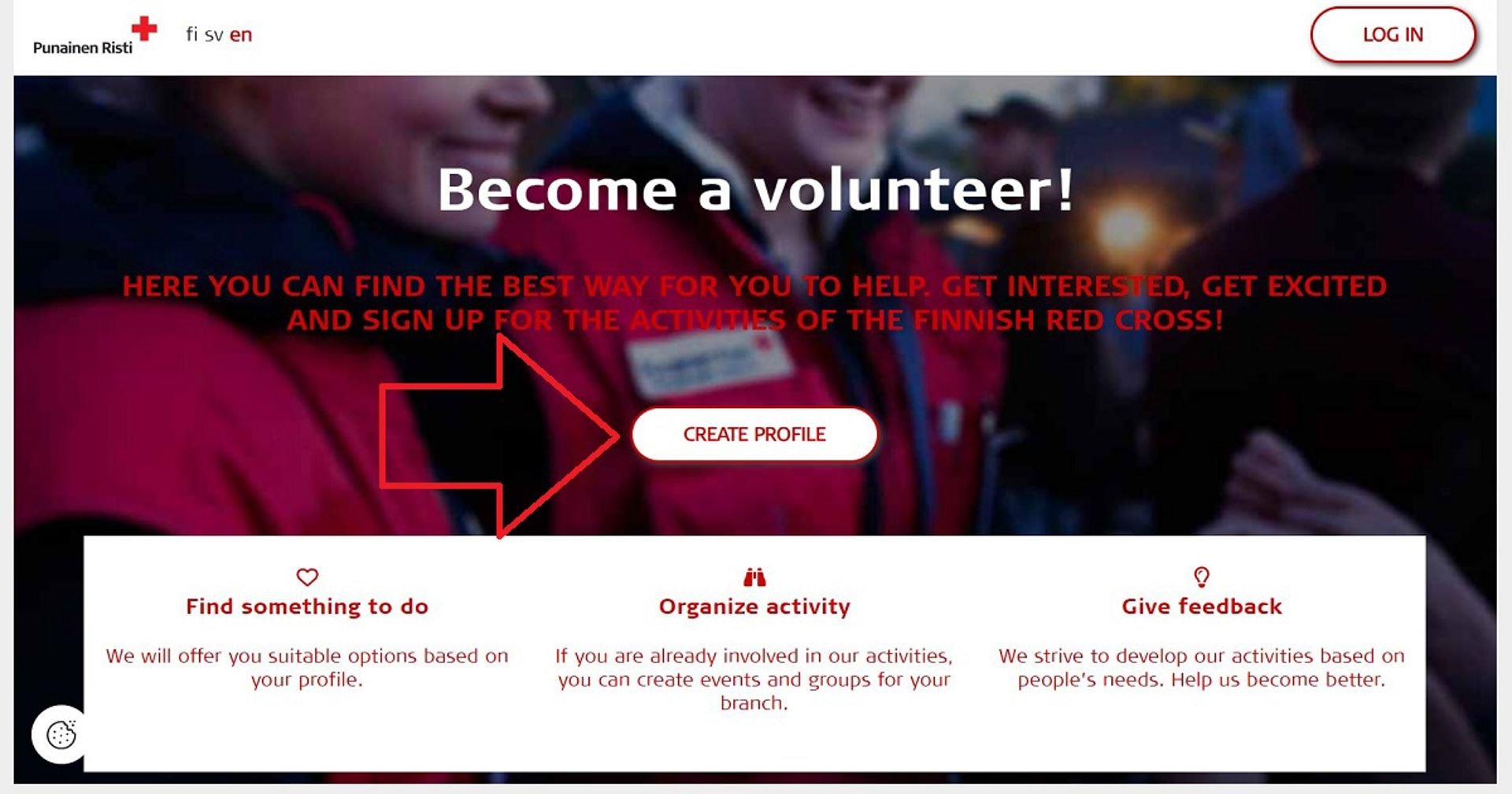
With your user profile, you can share information about yourself and your skills, and search for suitable volunteer opportunities. You will be asked to provide your contact details and the area where you wish to be active.
If you don’t know which local branch to choose, you can enter the postal code of the area where you want to volunteer when asked about your activity area. You can also select a local branch from a list if you already know where you want to be active. You can later change your activity area and local branch by editing your profile.
Oma’s guide is also available in Ukrainian, Russian, and Arabic. A video in Finnish is also available to show you how to create a profile.
Log in to Oma at oma.punainenristi.fi. You can log in using your credentials via the Log in button in the top right corner. Your username is the personal email address you provided when creating your profile.
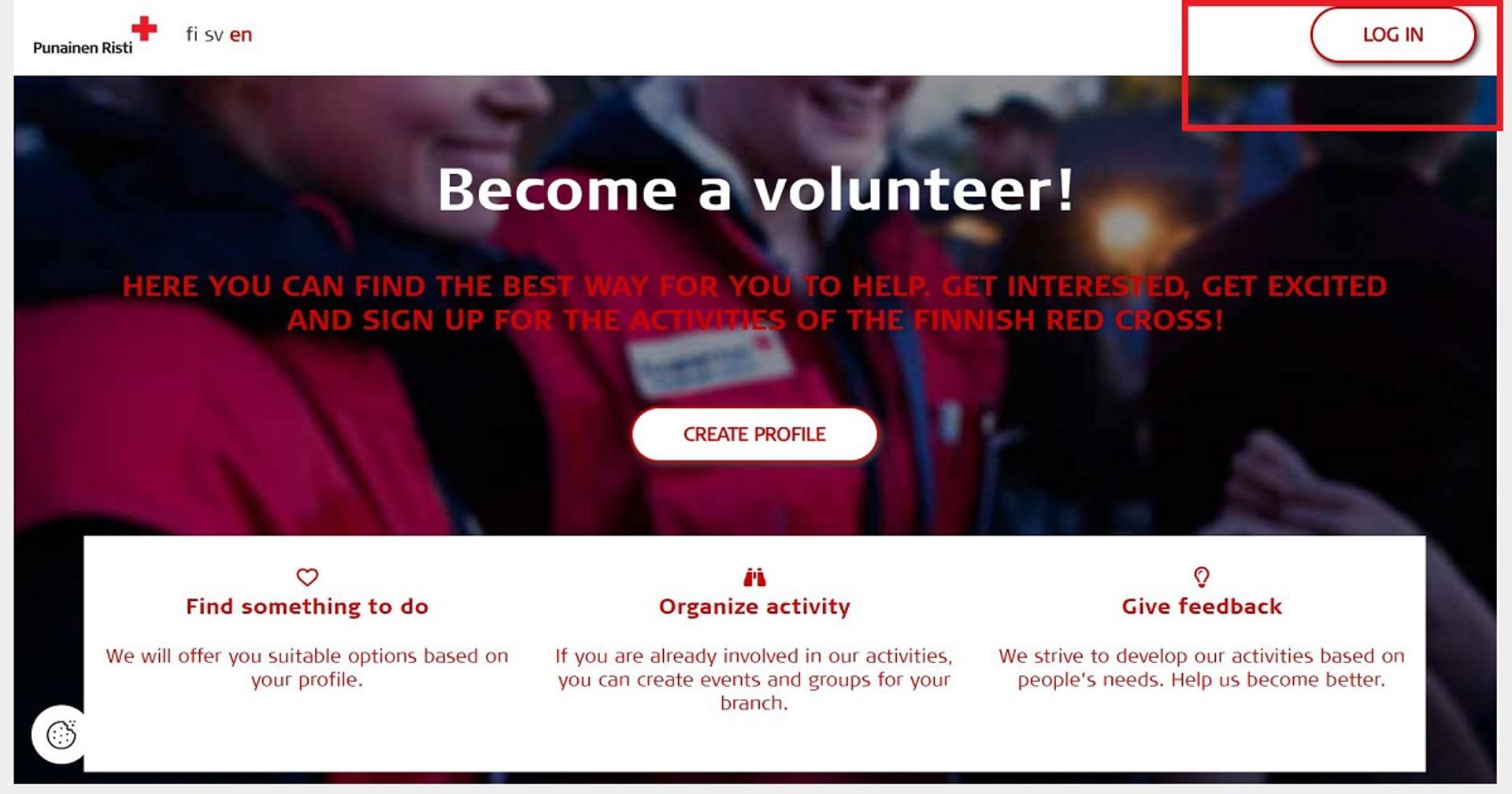
If you're using Oma on a mobile phone or tablet, the Log in button will appear when you tap the icon with three horizontal lines on the right.
Remember to log out if you're using a device or computer that is shared with others (e.g. in public spaces like libraries).
Log in. Then, on the homepage, you'll find the Edit profile button under your name. By clicking it, you can add a photo to your user profile, update or change your personal information, or change your password.
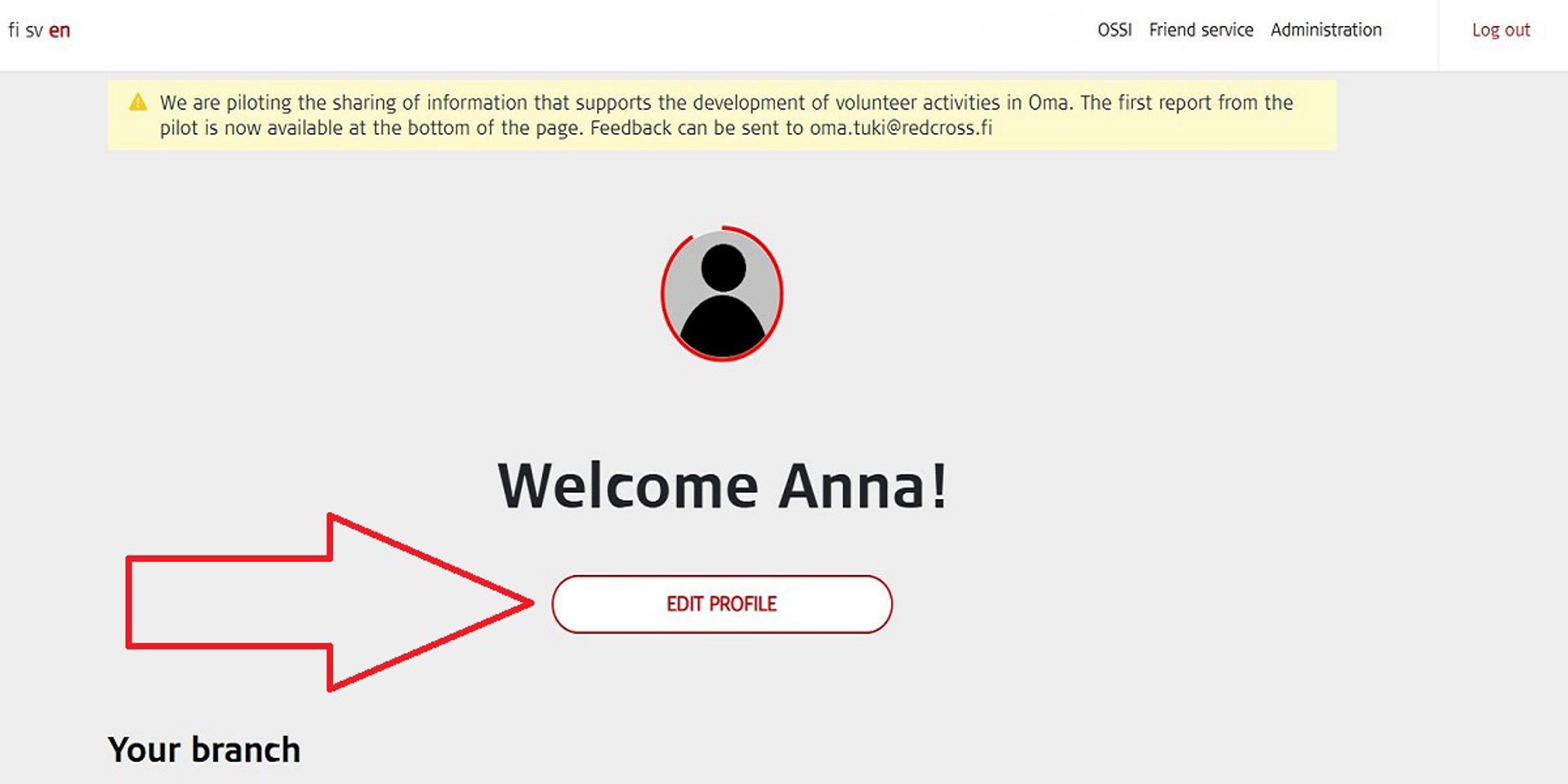
To change your email address or password, first log in to Oma. Then click the Edit profile button under your name on the homepage. Scroll down to the bottom of the page and click the pencil icon next to the Login details section.
On the page that opens, you’ll be asked to enter your current password, after which you can change your email address and/or password.
Please note that after changing your email address, you will need to use the new email address to log in to the system from then on.
You can choose which local branch you want to volunteer with. To change your activity area in Oma, log in and click the Edit profile button under your name on the homepage. Scroll down slightly and click the pencil icon next to the Area of activity section. On the page that opens, you can enter your desired area based on postal code. Remember to save your changes.
Please note that the volunteer branch in Oma and the membership branch in the Finnish Red Cross are not automatically the same. You can be a member of one branch and volunteer in another (volunteer branch).
You cannot change your membership branch via Oma. You can read more about membership here. Through the link, you can also report changes to your membership and switch branches if needed. Your current membership details are shown in Oma under your profile information.
Once you have completed the basic course in friend activities and the trainer has marked you as trained in Oma, you can create a friend volunteer profile via the Edit profile button on the homepage. At the bottom of your profile page, a Create friend volunteer profile button will appear. Clicking it will open additional questions.
If you do not see the button, you have not been marked as trained. In that case, contact the person responsible for friend activities in your local branch.
Fill in the required information and then click Save.
When you log in to Oma, you will see a report at the bottom of the front page, open to all logged-in users. The report allows you to review the activities of branches in Oma – such as groups, events, and the number of volunteers involved. It also provides a broader overview of activities carried out via Oma at both regional and national levels.
In the future, Oma will include a report gallery, where you can view reports that support the development and measuring of the activities.
Your information is visible to responsible volunteers in your local branch. It is recommended that every volunteer participating in Red Cross activities creates a user profile in Oma, so that local branch coordinators can see all active volunteers and communicate with them.
You can read more about the Red Cross's data protection practices here.
If you’ve forgotten your password, you can request a new one via the I forgot my password link on Oma’s login page. Instructions for resetting your password will be sent to your email address. If you don’t find the instruction email, please check your spam folder.
If you experience technical issues with password recovery, please contact Oma Support at oma.tuki(at)redcross.fi.
Log in. Then click the Edit profile button under your name on the homepage. Scroll to the bottom of the page and click the Go to profile deletion page button. On that page, you can delete your profile.
Your profile will be deleted immediately if you do not have user levels as a responsible volunteer and are not a friend volunteer. In such cases, your deletion request will be sent to the Oma administration, who will remove the profile for you.
Oma and the electronic friend matching system are connected. Your Oma account cannot be deleted if you have a one-on-one friend relationship or are acting as an online friend. If you wish to end a friendship, please contact the friend matching service in your area.
The Red Cross safer space principles also apply to Oma.
If you experience inappropriate behaviour in Oma, see inappropriate content in other profiles or notice inappropriate posts in groups, events, etc., report it to your branch’s Oma administrator/possible group leader/district worker and always also to Oma support (oma.tuki(at)redcross.fi). Any further action will be determined according to the specific situation.